 5 min
5 min
Lexibar and Antidote Pair Up Perfectly in Remedial Education

Over the years, technological tools have proven effective in supporting students with learning disabilities. Eugénie Pettigrew-Leydier, a remedial teacher (also known as resource teacher), advocates for universal access to these tools at every educational stage. However, she stresses the importance of personalized guidance to ensure tools are properly employed and have lasting positive effects.
In this article, learn about two software programs she uses daily to help students overcome reading and writing difficulties: Lexibar and Antidote. She explains how their respective functions enable her to adapt her interventions according to students’ progress and help them develop their independence. See three scenarios that showcase how these two applications complement each other.
Two Apps to Gain Independence in Writing
Writing assistance software are crucial for students with learning disabilities. Not only do they motivate them, but they also help them to refine their skills and reach their full potential.
“In the school system, the main method of evaluating students relies on reading and writing, which disadvantages those who have learning difficulties,” notes Pettigrew-Leydier. “Many students fail, even though they successfully express themselves out loud, come up with complex ideas and create intricate material.”
In this case, technology isn’t a crutch fostering intellectual laziness. On the contrary, it helps people overcome disadvantages. “Just like a nearsighted person wears glasses, students use assistive technology as support for their learning,” she continues.
Pettigrew-Leydier starts her interventions by showing students how to use Lexibar while writing so they can turn their ideas into text more easily. Then, she encourages them to use Antidote to proofread their text and revise their grammar. These tools don’t do the work for them; students must actively participate in the writing process and learn to make informed decisions.
Comparing Lexibar and Antidote
Both tools correct spelling and have complementary features that address specific needs.
| Lexibar | Antidote | |
|---|---|---|
| Objectives | Foster reading comprehension and improve spelling | Improve spelling, grammar, syntax and writing style |
| Scope |
|
|
| Activation |
|
|
| Interface | Colour codes, illustrations and word prediction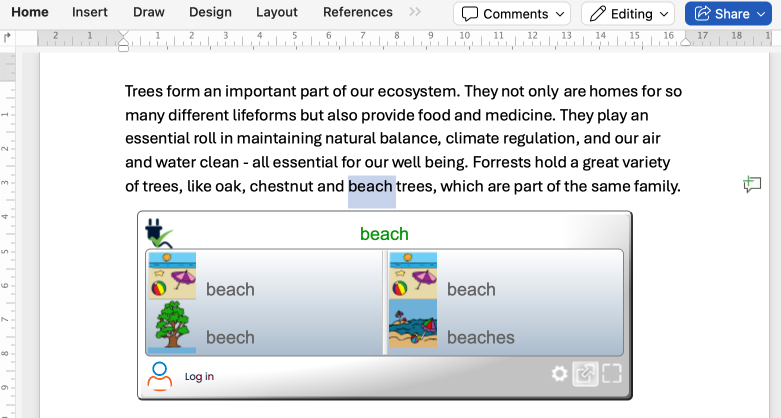 |
Underlined detections in the text with explanatory tooltips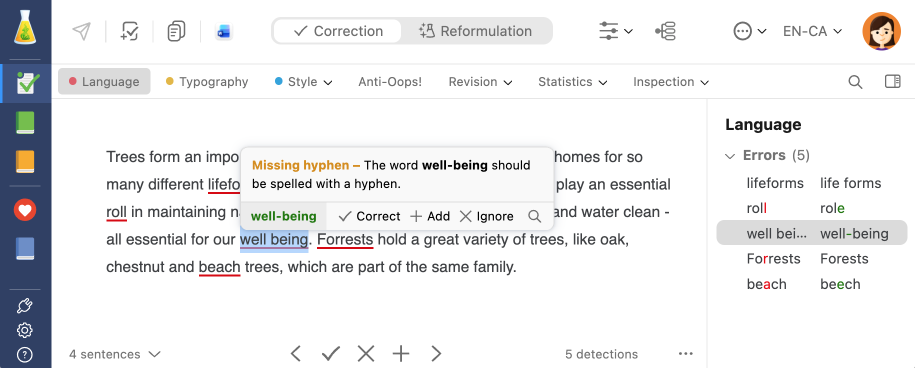 |
| Tools |
|
|
| Context of use |
|
|
Providing Guidance for Effective Software Use
New software can be challenging for students with learning disabilities. “Part of my role is to support students as they begin using these tools,” explains Eugénie Pettigrew-Leydier. “With Antidote, for example, I start by presenting different aspects of the corrector, like the underlining colours of the Language view and the Style view filters. I use an example text with only a few errors to prevent students from feeling discouraged when seeing red lines everywhere.”
She also notes that even though younger generations were born surrounded by screens, many students have poor digital literacy. They need to develop the technical and cognitive skills required to correctly use software and analyze information. This is why it’s important to guide them through each development stage.
Pettigrew-Leydier uses interactive games and illustrations to spark younger students’ interest. Once students reach their teens, they have better computer skills, so she introduces other tools and shows them how to properly use them. With students in post-secondary education, she focuses on helping them develop an effective revision method, strategies to prepare for evaluations, and good habits for consulting reference works.
Digital tools have also proven valuable for people whose first language isn’t English. While these students may not have a learning disability, they sometimes struggle to keep up because learning a new language at the same time as the subject matter can be quite challenging.
“I focus on relevant functions and introduce them gradually so that the student understands the advantages of the software, gains in confidence and starts writing more independently,” explains Pettigrew-Leydier.
Scenarios Demonstrating How Lexibar and Antidote Complement Each Other
Here are three scenarios where these apps support students throughout their learning.
Scenario 1: Anne, 10 years old, diagnosed with dyslexia and dysorthographia
Anne has a vivid imagination and loves to make up stories. But when she tries to put them on paper, her ideas get muddled. The letters get mixed up, and she starts panicking. She loves comic books and graphic novels, but her dyslexia wears her out and her dysorthographia bothers her so much that she loses inspiration.
To help her translate her ideas from her head into writing, she learned to use Lexibar’s phonetic prediction. It assists her as she is writing, which helps her regain confidence. And with the illustrations feature, she makes sure she’s using the correct homophones.
Anne enriches her writing by exploring Antidote’s dictionaries, like the ones of semantic fields and synonyms, to choose her nouns, adjectives and verbs. Recently, she even started writing poems for her family and classmates using the dictionary of rhymes.
Scenario 2 : Samuel, 16, ADHD diagnosis
Samuel is convinced he will fail his English final, which frustrates and demoralizes him. When he doesn’t focus, his attention deficit causes him to cut corners. He inverts or omits letters, and his meandering thoughts result in convoluted writing. On the other hand, he loves speaking in public and excels at oral presentations.
Samuel’s favourite Lexibar feature is the text-to-speech. The vocal feedback on his text helps him validate the content. He also likes to minimize distractions by sometimes disabling the illustrations.
Thanks to Antidote’s corrector, he develops a habit of always double-checking how words are spelled. He gets discouraged less and less when he sees red underlining because he’s learned to correct his text one mistake at a time. To better organize his ideas, he uses a style filter to make sure his sentences contain no more than 15 words.
❤️ Eugénie Pettigrew-Leydier’s favourite feature
“I love the readability filter Long sentences in Antidote’s corrector. It’s very useful for students who write as they think and have trouble concluding their sentences. It helps separate and clarify their ideas.”
Scenario 3 : Lena, 20, newcomer, med student
Lena is a full-time university student. English is her third language and she’s having trouble keeping up in class, even though she is studious, meticulous and organized. She would surely excel if she were studying in her mother tongue, but submitting an assignment in English is a frightening first.
She finds Lexibar quite useful, since she sometimes writes by sound and the phonetic prediction provides word suggestions as she types. The spell check feature also helps her make sure she’s writing tricky words correctly (e.g. silent letters and suffixes).
Once she’s done with her first draft, Lena uses Antidote’s corrector to revise and improve her text. She likes that the tooltips provide not only explanations that help her understand her mistakes but also links that take her to the relevant dictionary entry or language guide article. Lena’s next goal? Make her English text more dynamic by using the passive voice less thanks to Antidote’s Style view.
Using both Lexibar and Antidote makes it easier for those who need reading and writing support to improve their language skills. “The longer students use them, the more they become aware of their progress,” explains Pettigrew-Leydier. “This reduces their anxiety, boosts their self-esteem and regulates their emotions. It completely changes not only their learning journey but also the rest of their lives.”

In 2017, she founded Aideor (in French only), an exclusively virtual remedial education service, to provide support for students beyond borders thanks to a team located all around the world.