Access Control Panel of the Interface Settings
Sensitive content
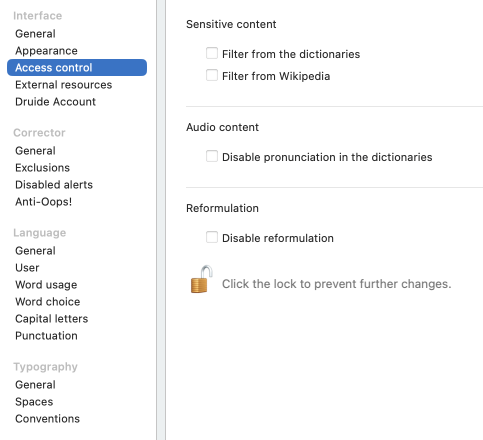
Filter from the dictionaries
Some words belong to an offensive register (e.g. the noun moron), or may have an informal meaning related to sex (e.g. knockers in the sense of “breasts”) or recreational drug use (e.g. crackhead). This setting allows you to hide some words or definitions that may be unsuitable for certain users.
Filter from Wikipedia
Wikipedia is an online encyclopedia whose content is written entirely by Internet users. The quality of its content is out of Druide’s control. If you prefer, Antidote can try to filter adult content from the Wikipedia articles it displays.
Audio content
Disable pronunciation in the dictionaries
Antidote can read aloud different elements in the dictionaries. This setting removes the speaker icon () from pronounceable elements in all the dictionaries.
Reformulation With subscription With subscription to Antidote+, Antidote Pro or Antidote Web"
Disable reformulation
The corrector’s Reformulation mode uses artificial intelligence to offer suggestions for rewording your writing. This involves sending your text to Druide’s servers. Although Druide does not keep any data submitted to Antidote for reformulation (see Reformulation and Data Privacy), you may occasionally want to disable this feature—in certain educational contexts, for example. When this setting is enabled, all interface elements relating to reformulation disappear.
- The settings in the Access control panel are disabled by default. To change them, you must first click the padlock icon and enter account credentials granting system administrator privileges on your computer.